
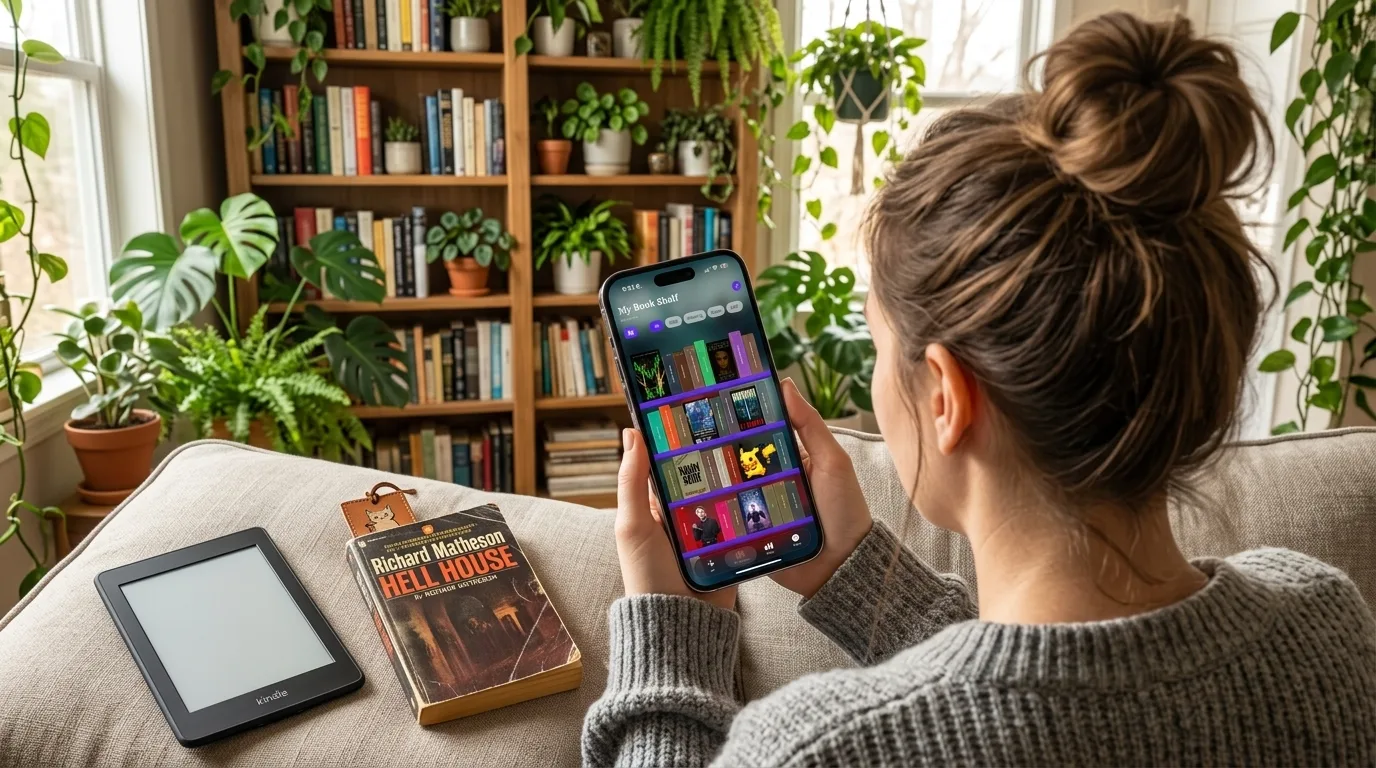

📚 A digital TBR jar with 190+ reading prompts across 17 categories — tap to pick your next read, or let “Mystery Book” mode randomly pull from your own shelf.
📖 The most beautiful bookshelf app on iOS — real visual shelves with colored spines, cover art, stickers, animated GIFs, and drag-to-rearrange layout.
✨ Built for BookTok and BookTube readers — import your Goodreads library via CSV, track page progress with a reading timer, and see your stats in an activity heatmap.
🌟 Zero data collection. Ever. — developer collects absolutely nothing about you or your reading habits.
💫 Free to start, $9.99 lifetime Pro — no subscription required to own it forever, cheaper than one month of most competing apps.
You’ve got 400 books on your TBR pile and you’ve been staring at it for 20 minutes. Sound familiar? Every BookTok reader knows the paralysis: too many great options, too little time, and no good way to just pick something. That’s exactly the problem TBR Book Jar was built to solve — and it does it better than any other reading tracker app on iOS.
What Is a TBR Jar? (And Why BookTok Is Obsessed)
If you’ve spent any time in BookTok or BookTube communities, you’ve seen the TBR jar trend. The idea is simple: write down every book on your to-be-read pile on slips of paper, drop them in a physical jar, and when you can’t decide what to read next, reach in and pull one out. It removes the decision fatigue, adds a little magic to the process, and — honestly — it just makes reading more fun.
But physical TBR jars have obvious limitations. Your TBR pile has hundreds of books. Paper slips get lost. You can’t filter by mood or genre when you’re specifically craving a cozy fantasy. And your jar can’t track how many pages you’ve read or remind you of your yearly reading goal.
TBR Book Jar is the digital version BookTok has been building toward. It takes the core joy of the TBR jar — that fun, low-stakes randomness — and pairs it with a full-featured reading tracker app built specifically for the way modern book lovers actually read. This isn’t just a TBR list app. It’s an entire ecosystem for managing your TBR pile, tracking your reading, and making your bookshelf look incredible on your iPhone.
Thanks for reading Pixel Buys | Finding things YOU LOVE is our job! Subscribe for free to receive new posts and support my work.
TBR Book Jar App Features — The Full Breakdown
The Jar: 190+ Prompts, Your Rules
The centerpiece of the app is exactly what you’d expect: a digital TBR jar. But it goes way beyond what a physical jar can do.
Tap the jar and it randomly selects a reading prompt from 190+ options across 17 categories — everything from genre-specific challenges (”Read a book with a map inside”) to mood-based picks (”Read something that will make you cry”) to author-focused prompts. You can filter prompts by genre, mood, challenge type, or author before the jar spins, so if you’re specifically in a thriller headspace, you’re not going to pull a cozy romance prompt.
The “Mystery Book” mode is where it gets really clever: instead of giving you a prompt, it randomly selects an actual book from your own TBR shelf. This is the digital TBR jar in its purest form — you’ve already curated your list of books you want to read, and the app just makes the decision for you.
Pro users can also add their own custom prompts and disable any built-in ones they don’t want. Your jar, your rules.
The Bookshelf: The Most Beautiful Reading Tracker on iOS
This is the feature that sets TBR Book Jar apart from every other book tracker app on the market. When you add books to your shelf, they don’t just appear as a list. They appear as actual colored book spines standing on wooden shelves — spine colors are automatically extracted from each book’s cover art.
Tap a spine and it flips to show the cover. Long-press for quick actions. Drag books around to rearrange them however you like. It looks and feels exactly like a real bookshelf, and it’s genuinely one of the most satisfying UI experiences in any app on iOS right now.
But the customization goes even deeper. You can add decorations, stickers, and animated GIFs to your shelves. Choose from custom backgrounds with blur effects. Pick from wood color presets. Switch between spine-out and face-out display modes. Whether you want a clean, minimal aesthetic or a maximalist BookTok-style shelf full of personality, the app supports both.
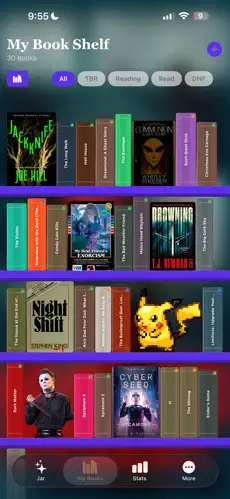 The visual bookshelf — each spine color is extracted from the book’s cover art
Reading Tracker: Actual Stats That Matter
TBR Book Jar isn’t just pretty — it’s a serious reading tracker iOS app with the stats to back it up.
The reading tracker includes: - Page progress with quick-tap buttons and a slider (no more mental math) - Reading timer with speed tracking so you can see your pages-per-minute over time - Rate and review finished books directly in the app - Book summaries pulled from Google Books and Open Library - Goodreads import via CSV — your entire reading history comes with you
The stats dashboard gives you a yearly reading goal with a satisfying progress ring, a reading streak tracker, a books-per-month chart, genre breakdown, activity heatmap, and a top-rated books list. If you’re a data-driven reader who loves seeing your reading habits visualized, this section alone is worth the Pro upgrade.
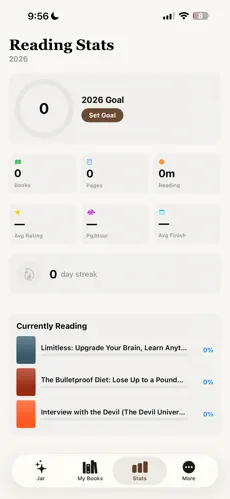 Reading stats dashboard — yearly goal ring, streak, monthly chart, genre breakdown, and activity heatmap
TBR Book Jar vs Goodreads vs StoryGraph
Let’s be honest: BookTok readers have complicated feelings about Goodreads. It’s the default, it has the community, but it’s also showing its age — clunky interface, ad-heavy, and not exactly built with the modern reader in mind. StoryGraph emerged as the “Goodreads alternative” with better mood-based recommendations and a cleaner design. Now TBR Book Jar enters the picture as the best book tracker app for readers who want something built specifically for the BookTok experience.
Goodreads wins on: Community and social features — if friend recommendations and reading challenges with others matter to you, Goodreads still has the network effect. Nothing else comes close for social reading.
StoryGraph wins on: Mood-based book recommendations from its dataset — if you want the algorithm to suggest your next read based on emotional tone and pacing, StoryGraph does this better than anyone.
TBR Book Jar wins on: Everything else that matters for the individual reader experience — the jar mechanic (completely unique), the visual bookshelf (nothing like it on iOS), zero data collection, no ads, and a $9.99 lifetime price that makes the $2.99/month alternatives look expensive over time. It’s the most fun reading app, built for how BookTok readers actually think about their TBR piles.
If you’ve been frustrated with Goodreads as a Goodreads alternative app and want something that feels native to the BookTok way of reading, TBR Book Jar is it.
Is TBR Book Jar Free? Pricing Breakdown
Yes — TBR Book Jar is free to download and genuinely useful in the free tier. Here’s exactly what you get:
Free tier includes: - 30 reading prompts in the jar - Up to 5 books on your shelf - Basic page progress tracking - Book search with cover art
Pro unlocks everything: - All 190+ prompts + ability to add custom prompts - Unlimited books on your shelf - Full reading stats (timer, speed tracking, yearly goal, streak, heatmap, genre breakdown) - Goodreads library import via CSV - Full bookshelf theming, decorations, stickers, and animated GIFs - Custom backgrounds and wood color presets
Pro pricing: - Pro Monthly: $2.99/month - Pro Lifetime: $9.99 (one-time, own it forever)
The lifetime option is the obvious choice for anyone who reads more than a few books a year. At $9.99, it pays for itself in 3-4 months compared to the monthly plan, and you never have to think about it again. For context: a single book on Kindle often costs more than the lifetime upgrade.
📚 Download TBR Book Jar — Free on the App Store
Who Is TBR Book Jar For?
This app was clearly built by someone who actually lives in BookTok culture — and it shows in every design decision. Here’s who’s going to love it most:
BookTok and BookTube readers who’ve been looking for a reading app that matches the visual, aesthetic-driven way they engage with books online. Your shelf in the app looks like the bookshelf content you make. It’s built for you.
Chronic TBR hoarders — if your TBR pile is a source of both joy and anxiety, the jar mechanic will genuinely change how you approach choosing your next read. Having the decision made for you (with filters so it’s never totally random) removes the paralysis without removing the fun.
Readers frustrated with Goodreads who want a cleaner, faster, ad-free Goodreads alternative that doesn’t feel like it was designed in 2008. TBR Book Jar imports your Goodreads history so you’re not starting from scratch.
Visual thinkers who want their reading life to look as good as it feels. The bookshelf customization is genuinely one of the most satisfying experiences in any iOS app, and it’s the kind of thing you’ll open just to look at.
Privacy-conscious readers who don’t love the idea of a company profiling their reading habits. Developer collects zero data. Your books, your shelf, your business.
Download TBR Book Jar Free
📚 Download TBR Book Jar — Free on the App Store
The TBR App BookTok Has Been Waiting For
The TBR jar trend on BookTok works because it solves a real problem: when you have hundreds of books you genuinely want to read, choosing the next one shouldn’t be the hard part. The physical version is charming but limited. TBR Book Jar takes that same energy and turns it into a full-featured reading tracker app that respects your time, your taste, and your privacy.
At $9.99 for lifetime Pro, it’s one of the best values in the book app space — cheaper than a single hardcover, and it’ll track every book you read for the rest of your life. The visual bookshelf alone is worth it. The jar mechanic is the whole point. And the reading stats will make you feel genuinely good about your reading habits in a way Goodreads’ cluttered interface never quite manages.
If your TBR pile stresses you out, download it free today. And if the jar mechanic immediately solves your “I don’t know what to read next” problem — which it will — the lifetime upgrade is a no-brainer.
📚 Download TBR Book Jar — Free on the App Store
Image credits: TBR Book Jar / App Store


0 Comments
No comments yet.